Status bar in ReactNative
React-native status bar is used to show the indicators like a battery, Network, notification, signals, etc. The status bar in Ios and android are different. So, we need to calculate each height separately.
To import status bar in code
To import status bar in code<StatusBar
barStyle = "dark-content"
// dark-content, light-content and default
hidden = {false}
//To hide statusBar
backgroundColor = "#00BCD4"
//Background color of statusBar only works for Android
translucent = {false}
//allowing light, but not detailed shapes
networkActivityIndicatorVisible = {true}
/>Background color is only supported in android, so in order to put background color in Ios, we need to wrap the status bar with view.
import React from 'react';
import {
  View,
  Text,
  ScrollView,
  StyleSheet,
  StatusBar,
  Platform,
} from 'react-native';

export const Header = () => {
  return (
    <View>
      <View
        //To set the background color in IOS Status Bar also
        style={{
          backgroundColor: 'red',
          height: Platform.OS === 'ios' ? 40 : 0,
        }}>
        <StatusBar
          barStyle="dark-content"
          // dark-content, light-content and default
          hidden={false}
          //To hide statusBar
          backgroundColor="red"
          //Background color of statusBar
          translucent={false}
          //allowing light, but not detailed shapes
          networkActivityIndicatorVisible={true}
        />
      </View>
    </View>
  );
};
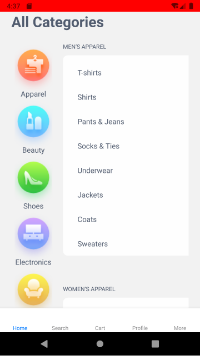
To Run the React Native App
Open the terminal again and jump into your project using.
cd ProjectNameTo run the project on an Android Virtual Device or on real debugging device
react-native run-androidor on the iOS Simulator by running
react-native run-iosThat was the React Native Statusbar. If you have any doubts or you want to share something about the topic you can comment below.

