Reactnavigation v5
Adding Icons and changing color in reactnavigation V5 tabbar as shown below.
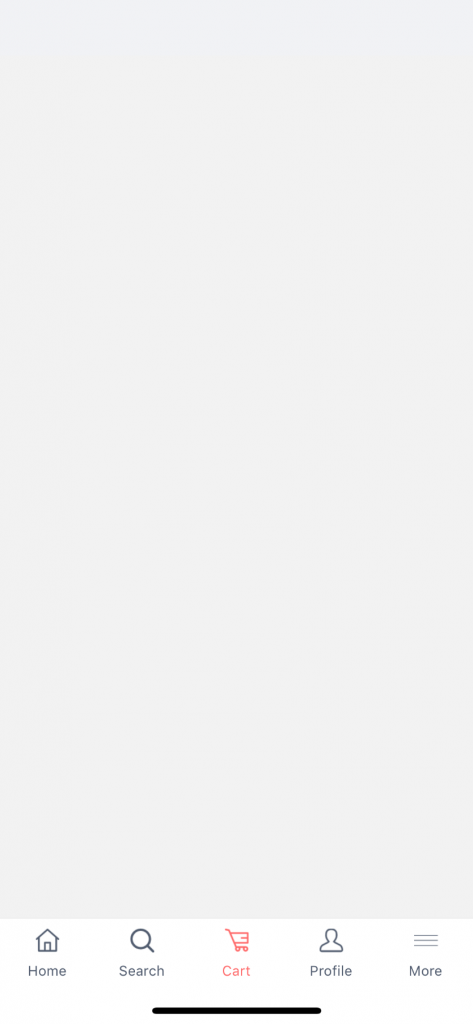
Before diving directly into code , lets first install all the packages
npm install @react-navigation/native
npm install @react-navigation/bottom-tabs
npm install react-native-reanimated react-native-gesture-handler react-native-screens react-native-safe-area-context @react-native-community/masked-view
If something is missing then please go through the documentation of react Navigation (https://reactnavigation.org/docs/getting-started)
import React from 'react';

import {Image} from 'react-native';
import {NavigationContainer} from '@react-navigation/native';
import {createBottomTabNavigator} from '@react-navigation/bottom-tabs';
import {createStackNavigator} from '@react-navigation/stack';

import {Images} from '../images'; // all the required images are placed in Imaged folder
import {AppColor} from '../constants'; // App color
import * as Screen from '../screens'; // imported all the screens

const Tab = createBottomTabNavigator();
const Stack = createStackNavigator();

// home screen
function HomeStack() {
  return (
    <Stack.Navigator headerMode="none" initialRouteName="Home">
      <Stack.Screen
        name="Home"
        component={Screen.Home}
        options={{tabBarLabel: 'Settings!'}}
      />
      <Stack.Screen name="AllCategory" component={Screen.AllCategories} />
    </Stack.Navigator>
  );
}
//Search screen
function SearchStack() {
  return (
    <Stack.Navigator headerMode="none">
      <Stack.Screen name="Search" component={Screen.Search} />
    </Stack.Navigator>
  );
}

//cart screens
function CartStack() {
  return (
    <Stack.Navigator headerMode="none">
      <Stack.Screen name="Cart" component={Screen.Cart} />
    </Stack.Navigator>
  );
}

//profile screens
function ProfileStack() {
  return (
    <Stack.Navigator headerMode="none">
      <Stack.Screen name="Cart" component={Screen.Profile} />
    </Stack.Navigator>
  );
}

//more screens
function MoreStack() {
  return (
    <Stack.Navigator headerMode="none">
      <Stack.Screen name="Cart" component={Screen.More} />
    </Stack.Navigator>
  );
}

export default function App() {
  return (
    <NavigationContainer>
      <Tab.Navigator
        screenOptions={({route}) => ({
          tabBarIcon: ({focused}) => {
            let iconName;
            if (route.name === 'Home') {
              iconName = (
                <Image
                  source={Images.tabHome}
                  style={{
                    width: 18,
                    resizeMode: 'contain',
                    tintColor: focused
                      ? AppColor.orangeColor
                      : AppColor.loginTextColor,
                  }}
                />
              );
            }
            if (route.name === 'Search') {
              iconName = (
                <Image
                  source={Images.TabSearch}
                  style={{
                    width: 18,
                    resizeMode: 'contain',
                    tintColor: focused
                      ? AppColor.orangeColor
                      : AppColor.loginTextColor,
                  }}
                />
              );
            }
            if (route.name === 'Cart') {
              iconName = (
                <Image
                  source={Images.TabCart}
                  style={{
                    width: 18,
                    resizeMode: 'contain',
                    tintColor: focused
                      ? AppColor.orangeColor
                      : AppColor.loginTextColor,
                  }}
                />
              );
            }

            if (route.name === 'Profile') {
              iconName = (
                <Image
                  source={Images.TabProfile}
                  style={{
                    width: 18,
                    resizeMode: 'contain',
                    tintColor: focused
                      ? AppColor.orangeColor
                      : AppColor.loginTextColor,
                  }}
                />
              );
            }

            if (route.name === 'More') {
              iconName = (
                <Image
                  source={Images.tabMore}
                  style={{
                    width: 18,
                    resizeMode: 'contain',
                    tintColor: focused
                      ? AppColor.orangeColor
                      : AppColor.loginTextColor,
                  }}
                />
              );
            }
            return iconName;
          },
        })}
        tabBarOptions={{
          activeTintColor: AppColor.orangeColor,
          inactiveTintColor: AppColor.loginTextColor,
        }}>
        <Tab.Screen name="Home" component={HomeStack} />
        <Tab.Screen name="Search" component={SearchStack} />
        <Tab.Screen name="Cart" component={CartStack} />
        <Tab.Screen name="Profile" component={ProfileStack} />
        <Tab.Screen name="More" component={MoreStack} />
      </Tab.Navigator>
    </NavigationContainer>
  );
}
If there are any confusion regarding the above code, please feel free to comment below.
