Login UI using ReactNative
Today we are going to achieve a login page UI from dribble using React-native(https://dribbble.com/shots/7198811-Registration-Screen-for-Mobile-App-PlantLovers)
First, let’s create a new project using expo init and navigate to the directory. Here, we don’t have to install any dependencies as we are just doing the UI part today. Below, down shows the UI which we are going to achieve. The first image is the login which we will create and the 2nd image is the dribble image.
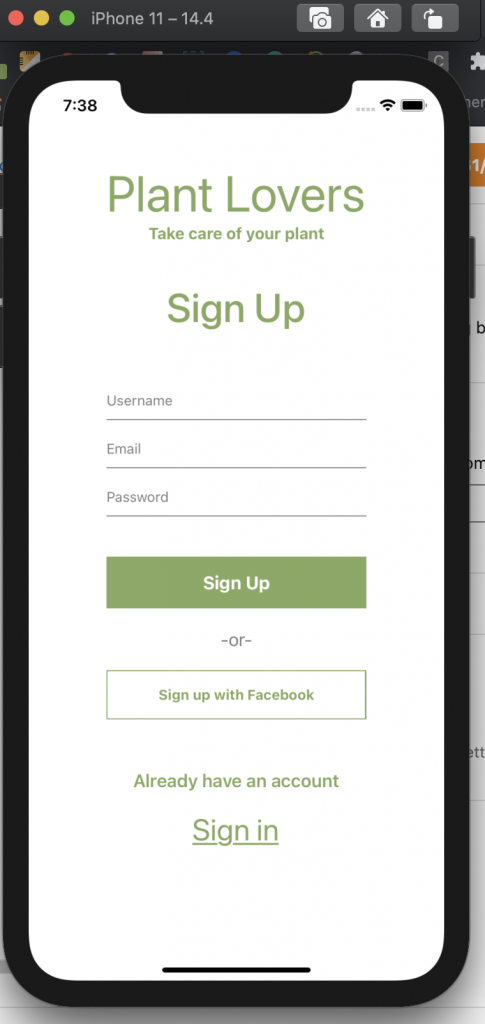

Create a new folder named src and under source create a new file name Login.js. And under Login.js file copy the following code.
import React from "react";
import {
  View,
  Text,
  TextInput,
  TouchableOpacity,
  StyleSheet,
} from "react-native";

export default function Login() {
  return (
    <View>
      <Text style={styles.title}>Plant Lovers</Text>
      <Text style={styles.subtitle}>Take care of your plant</Text>
      <View style={styles.signUpTextContainer}>
        <Text style={styles.signUpTextLabel}>Sign Up</Text>
      </View>
      <View style={styles.textInputContainer}>
        <TextInput
          placeholder="Username"
          style={styles.textInputStyle}
          placeholderTextColor={"grey"}
        />
        <TextInput
          placeholderTextColor={"grey"}
          placeholder="Email"
          style={styles.textInputStyle}
        />
        <TextInput
          placeholderTextColor={"grey"}
          placeholder="Password"
          style={styles.textInputStyle}
        />
      </View>
      <TouchableOpacity style={styles.signUpContainer}>
        <Text style={styles.signUpText}>Sign Up</Text>
      </TouchableOpacity>
      <View style={styles.orTextContainer}>
        <Text style={styles.orText}>-or-</Text>
      </View>
      <TouchableOpacity style={styles.signUpFacebookContainer}>
        <Text style={styles.signUpFacebookText}>Sign up with Facebook</Text>
      </TouchableOpacity>
      <View style={styles.signIn}>
        <Text style={styles.haveAccount}>Already have an account</Text>
        <TouchableOpacity style={styles.signInContainer}>
          <Text style={styles.signInText}>Sign in</Text>
        </TouchableOpacity>
      </View>
    </View>
  );
}

const styles = StyleSheet.create({
  title: {
    fontSize: 50,
    color: "#86aa5f",
  },
  subtitle: {
    fontSize: 16,
    fontWeight: "bold",
    textAlign: "center",
    color: "#86aa5f",
  },
  signUpText: {
    fontSize: 45,
    fontWeight: "bold",
    textAlign: "center",
    color: "#86aa5f",
  },
  signUpTextContainer: {
    marginVertical: 40,
  },
  signUpTextLabel: {
    textAlign: "center",
    fontWeight: "500",
    fontSize: 40,
    color: "#86aa5f",
  },
  textInputContainer: {
    marginVertical: 20,
    color: "red",
  },
  textInputStyle: {
    borderBottomColor: "grey",
    borderWidth: 1,
    borderTopWidth: 0,
    borderLeftWidth: 0,
    borderRightWidth: 0,
    marginBottom: 20,
    paddingBottom: 10,
  },
  signUpContainer: {
    backgroundColor: "#86aa5f",
    padding: 15,
  },
  signUpText: {
    color: "#ffff",
    fontWeight: "bold",
    fontSize: 18,
    textAlign: "center",
  },
  orTextContainer: {
    marginVertical: 20,
  },
  orText: {
    textAlign: "center",
    fontSize: 18,
    color: "grey",
  },
  signUpFacebookContainer: {
    borderColor: "#86aa5f",
    padding: 15,
    borderWidth: 1,
  },
  signUpFacebookText: {
    color: "#86aa5f",
    fontWeight: "bold",
    textAlign: "center",
  },
  signIn: {
    display: "flex",
    justifyContent: "center",
    alignItems: "center",
    marginVertical: 50,
  },
  haveAccount: {
    color: "#86aa5f",
    fontSize: 18,
    fontWeight: "600",
  },
  signInContainer: {
    marginTop: 20,
  },
  signInText: {
    fontSize: 30,
    color: "#86aa5f",
    textDecorationLine: "underline",
  },
});
Here, is the Github Link.
https://github.com/TriptiPant01/loginUI
Please feel free to comment it, so it helps me to improve.
